
Centralized billing and licensing
All billing and licensing for Atlassian Marketplace apps is handled directly by Atlassian. Payments, quotes, and orders are managed by Atlassian, not by app vendors.
Purchasing
-
Monthly subscription
After a 30-day free trial (initiated by a site admin), the app’s cost is automatically included in your next Atlassian bill unless you deactivate it. Payments are charged automatically with your regular Atlassian instance payments.
-
Annual subscription
Requires a manual quote and purchase after the trial period. You pay for a fixed user count (no refunds if user count decreases; upgrades needed if it increases).
Purchase options:
-
directly via the Atlassian website
-
through my.atlassian.com
-
by requesting a quote from Atlassian Sales Support
For help with quotes, orders and licensing contact Atlassian Support.
If you are having difficulty with Atlassian Support or need additional help send Easy Apps a support ticket or email support@easyapps.app.
Trials and renewals
-
30-day free trial for all Marketplace apps
-
monthly subscriptions, if you don’t deactivate before the trial ends, billing starts automatically
-
annual subscriptions, you must manually purchase to continue after the trial
You can trial any Marketplace app (cloud or Data Center) free for 30 days. App trials must be initiated by the cloud site admin or Data Center Atlassian administrator.
For monthly cloud subscriptions, once the trial period ends, the cost of the app is automatically included in your next bill unless manually deactivated. Cloud subscriptions billed annually will require a manual quote and purchase to retain functionality beyond the trial period.
From Atlassian support
Pricing calculation
Pricing of all apps depends on the numbers of users in your instance, not actual app users. This is defined by Atlassian not Easy Apps.
Monthly subscriptions
Pro-rating. Example:
If you add 10 users halfway through your monthly billing cycle, you will only be charged for those 10 users for the remaining half of the month, not the full month.
The adjustment is calculated so you pay only for the time the additional users had access to the app during that billing period.
When you add or remove users during a billing cycle, Atlassian automatically adjusts your next bill to reflect the change. You are only charged for the number of users in your Atlassian instance, not just those using the app.
Annual subscriptions
No pro-rating.
You pay for a fixed user count for the entire year. If your user count increases, you must upgrade your license and pay the difference for the remainder of the annual term. No refunds are given if your user count decreases during the year.
Price change rules
Marketplace Partners are able to change prices for their apps every 30 days. Atlassian highly recommends that Marketplace Partners communicate price changes with their existing customers, and most Marketplace Partners are committed to proactively communicating in this regard.
If you're using a Marketplace app that increases in price, you will have a 60-day price override you can use to pay the lower price when you renew or purchase. You will receive the renewal price override long as you're on the same product edition and the quote is created before the renewal override date (60 days from the price change).
Even if you're just trialing an app, you can pay the lower price if you purchased the app before the trial expires. If you're trialing an app in server/Data Center you'll receive the new price, unless you have a pre-existing quote.
If the new price isn't acceptable to you and you'd like to request an adjustment, you can reach out to the Marketplace Partner directly to see if a promotion might be applied.
From Atlassian Marketplace FAQs.
Expired licenses
After your evaluation or paid period ends, you have a 14-day grace period to make payment. If payment isn’t made, access to the app is blocked, but your data remains safe.
If you need help send Easy Apps a support ticket or email support@easyapps.app.
Note: it can take Atlassian time to update license and transaction data.
Payment issues
If payment fails (e.g., expired credit card) administrators can update billing details in Confluence administration under Billing section.
Check license status
Installation status
-
Via Apps
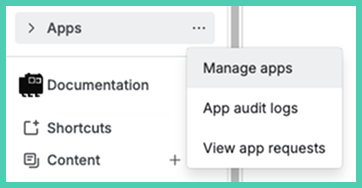
-
Via administration
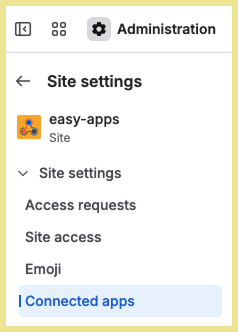
Note: this only shows if the app is installed. It does not show if the license is valid or expired.
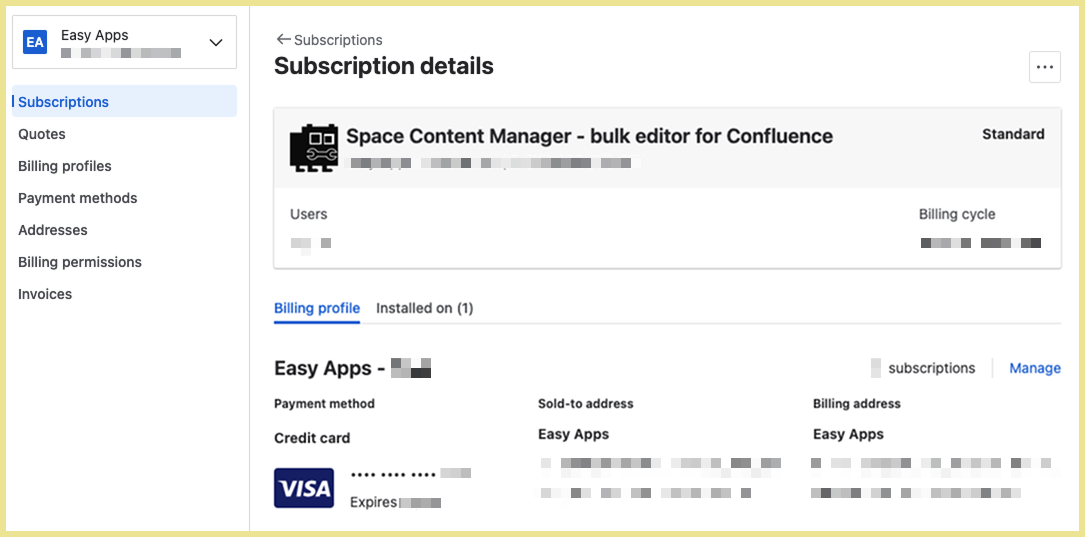
License and subscription status
Go to the Billing section in your Confluence administration.
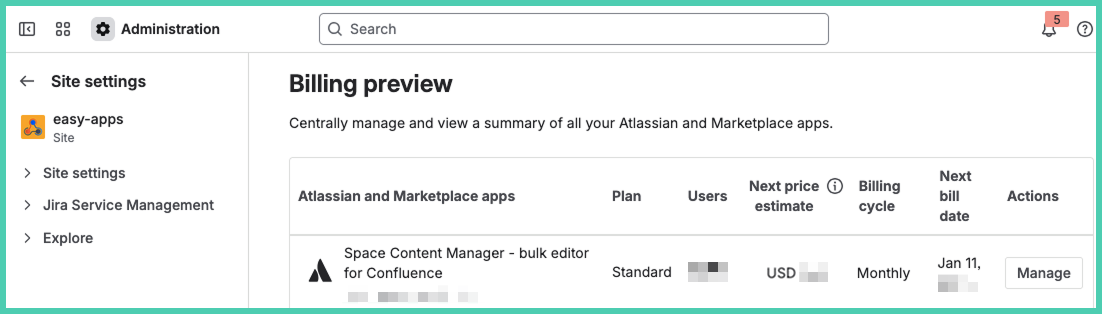
Click on ‘Manager’ under actions.
Monthly versus annual app subscription
|
Feature |
Monthly subscription |
Annual subscription |
|---|---|---|
|
Billing |
Automatic, monthly |
Manual, yearly |
|
User count |
Flexible, billed per current users |
Fixed for the year, must upgrade if user count increases |
|
Refunds for decrease |
N/A |
Not available |
|
Discount |
No |
Yes (pay for 10 months, get 12) |
|
Purchase process |
Automatic with instance billing |
Manual via website, My Atlassian, or Sales Support |
|
Trial conversion |
Auto-billed unless deactivated |
Must manually purchase to continue |